Showing posts with label ipod. Show all posts

Sunday, February 03, 2008

Making Every Possible Mistake!


Did you see the MacBook Air commercial yet? Quite catchy, right?


I decided to find the full song and guess what? I think there was hidden message there!


Listen to it and try to find what Apple marketing department was trying to tell you?


I’m a new soul I came to this strange world hoping I could learn a bit about how to give and take but since I came here felt the joy and the fear finding myself making every possible mistake...


  • No disk driv
  • Non-removable battery
  • 2 GB non-removable ram, 4200 RPM 80Gb hard drive.
  • 1 usb port, 1 headphone jack, 1 micro-DVI. $1799
  • And...

Does it make sense now? DUH!


Monday, December 31, 2007

Apple iPhone + Subway Map


As you know you can take advantage of the iPhone's thumbnail system for your photos but what you need to know is that, you can do the same with your city's subway map! Basically this map includes few sliced images from the actual subway map in such a way that you can pan across the map with the forward and back buttons. Subway maps usually are available as a PDF file but navigating the few hundred kilo bytes PDF file on the iPhone is very slow yet (beside the connection!). Also some of the disadvantages by using these kind of maps is that sometimes they have so many details and a little bit complicated! And if you have low res images you can’t really use the map (distorted and pixilated images).


I just collected couple of links from different websites! You can download these packages below and upload the images to your iPhone and use them the same way you browse your pictures.


Also,


Other Option


Filemarks let you store high res images, text files, and PDFs on an iPhone! There aren’t any good ways to do this with the built in Apple tools - you can use iPhoto to copy images, but they’ll be scaled down and become unreadable. If you want to read a pdf on your phone, you have to either email it to yourself or browse to it in Safari. Filemarks store your file’s data inside a bookmark. When you want to view your file, you open the bookmark in Safari on the iPhone and you can view it, whether your phone is online or offline.


Basically Filemarks let you store much higher quality images than the built in photo application. Check it out,


http://mac.softpedia.com/get/Utilities/Filemark-Maker.shtml

Thank you

Tuesday, July 03, 2007

Thursday, June 07, 2007

Friday, May 26, 2006

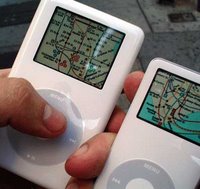
Apple iPod + Subway Map

Well well well! Something new again for iPod! In the big cities especially like here (NYC) almost everyone use subway systems and on the other hand iPod is become very common device for people around here, so it seems like such a great idea to digitally shrink maps of major subway systems and put them online so people can download them to their iPods, isn't it?

Putting the subway maps onto your iPod isn't all too difficult. First you'll need an iPod Photo. If you can't find the iPod photo on the Apple website (http://www.apple.com/), it's because all iPods (not counting the iPod Mini and Shuffle) are color versions which come with photo support.

For more information and download the maps for free visit http://www.ipodsubwaymaps.com/. They are available for the iPod nano, the iPod photo (4G) and the new iPod video (5G). Download the maps from iSubwayMaps. Just go to iSubwayMaps FAQ for install instructions. It is quite easy. The maps are free, please donate via PayPal to the author if you like them. The author has been under attack lately, from transit authorities in New York City and San Francisco, who have issued cease and desist letters for alleged copyright infringement. Apple also made him change the name of his site from iPodSubwayMaps.com to iSubwayMaps.com. All for offering a nice free service to people!

Driving Directions on Your iPod
There is a new service called iPodiWay that makes it easy to put Yahoo! maps on your iPod.

I have been using a shareware application called PodQuest $9.95 OS X only, for years to put text directions in the notes section of my iPod.

The current version of PodQuest supports the following map sites:
Google Maps (North America/UK)
Yahoo Maps (North America)
MapQuest (North America/Europe)
MapBlast (North America)
Mappy (Europe)
RandMcNally (USA)
ViaMichelin
WhereiS (Australia)
Krak (Denmark)
Wises (New Zealand)
MapsOnUS (USA)
Maporama (Worldwide)
Multimap (Worldwide)

I think all big companies like Microsoft, Yahoo and Google will provide some services like this very soon. Money Talks and Everything Else Walks!

Also download NYC subway map for the iPhone
2.8MB Zip

Find out more about NYC subway map for the iPhone